


MD335 Hybrid watch face
4.6162.00 Reviews
App Specs
- Version
- Varies with Device
- Updated On
- License
- $2.29
- Downloads
- 50,000+
- Developer
- Matteo Dini MD ® Watch Faces
- Categories
- Personalization
- Platform
- Android
Screenshots
 Analysis by AppCompare
In a shared household, a watch face can be a surprisingly personal choice. I might want an at-a-glance mix of time and useful details, while someone else borrowing the same Wear OS watch may prefer a quieter look. MD335 Hybrid is best understood as a customizable face for one person to set up around their own routine, rather than a household coordination tool. Its appeal is the blend of analog character and digital information; the main question is whether that balance suits the person who will wear it most.
One watch, one wearer’s routine
Picture a busy morning: I’m getting ready for work, checking the time while packing a bag, and glancing at my wrist before heading out. A hybrid face can make that quick check feel more natural than opening separate screens, because the hands keep the time familiar while digital fields put selected details nearby. Later, another person in the home might borrow the watch for a short errand. The face will still reflect the first wearer’s choices, so it is worth treating those choices as personal settings rather than assuming they will fit everyone.
That distinction matters most when people share devices casually. A watch face changes what appears on the watch, but it does not turn the watch into a shared schedule or a family dashboard. I would choose it for an individual who wants a useful everyday display, not for a household that needs everyone’s information organized together. If the watch regularly changes hands, a simpler face with fewer personal details may be less confusing.
Set it up for a glance, not a screen full of detail
The practical advantage of customization is not that every available item needs to be shown. It is that I can decide which details deserve space during the day. For a workday, I would keep the time and the information I check most often prominent; before a run, I might favor fitness-related details. That small change in priorities can make a watch easier to read quickly than filling every visible area just because the options are there.
There is a trade-off: more information can mean more visual competition. Analog hands, digital fields, and decorative elements all have to share a small display. I would start with a restrained layout, wear it through an ordinary day, and only then adjust the colors or displayed information. That is a more useful test than judging the face while browsing its customization options, because it shows whether the details are readable in the situations where I actually glance at my watch.
What customization can and cannot solve
Color choices are useful when I want the watch to look less formal or coordinate better with what I am wearing, but a different palette does not automatically make every detail easier to read. Contrast and the size of a glanceable element matter more than matching a particular outfit. If I often check the time outdoors or while moving, I would favor legibility over a subtle color combination. If I mainly wear the watch in calmer settings, a more decorative arrangement may feel like a worthwhile personal touch.
It also helps to decide what the watch face is meant to replace. It can make selected information visible without opening another screen, but it is not a substitute for exploring a full fitness app, reading a long notification, or managing a calendar. I would use it as a quick visual layer, then open the relevant app when I need context. That keeps the face useful instead of expecting a small watch display to do too much.
Worth Reading Before You Choose

EA SPORTS FC Mobile 26 Is a Bigger Football Game, but It Takes Time

Flipboard Shows What News Apps Must Do Beyond the Feed

Switching to Android Auto Means Rethinking Your Driving Routine

Google Calendar Makes a Crowded Week Easier to Manage

Ludo King Makes the Most of the Minutes Between Plans

Baby Panda World Brings Quick Play to Modern Phones, but Its Game Library Feels Busy
Who will appreciate the balance
I think this style suits someone who likes the familiar look of hands but still wants digital details close at hand. It may be especially appealing if the default faces on a watch feel either too plain or too crowded, and if spending a little time tailoring a display sounds enjoyable rather than tedious. People who prefer a single, fixed design with no setup may be happier with a built-in option, while someone who wants a dedicated workout layout may prefer a face designed around that one purpose.
It is also a less natural fit for anyone who expects a watch face to coordinate several people’s plans or to make a shared device feel personalized for each wearer automatically. I would not choose it for that job. Its strengths are visual balance and individual choice; household organization still belongs in the appropriate calendar or communication tools, not in the face itself.
Cost, compatibility, and a sensible trial
MD335 Hybrid is a Wear OS watch-face app from Matteo Dini MD ® Watch Faces, in the personalization category. It costs $1.99, carries an Everyone age rating, and was released on March 16, 2024. Before paying, I would check that the watch runs Wear OS and that the installation route offered by the app store fits the watch and phone I use. “Smartwatch” is not a universal compatibility promise: a face made for Wear OS is not automatically suitable for an Apple Watch or another platform.
The app has an average rating of 4.6 from around 1,800 ratings, with over 50,000 installs. Those figures suggest that it has found an audience, but they cannot tell me whether its particular look will suit my wrist or whether I will enjoy adjusting it. I would judge it by a simple test: can I read the information I care about at a glance, and does the design still feel comfortable after a full day? If not, a built-in face may be the better value, even if this one offers more room to personalize.
A quick household check before installing
If the watch belongs to one person, the simplest approach is to let that wearer choose the layout and keep the watch’s broader settings under their control. If a parent is helping a child use a watch, I would first consider whether the child needs a customizable face at all, and whether the information displayed is appropriate for that child’s everyday use. The Everyone rating is a content classification, not a promise that the app includes family accounts, parental controls, or shared profiles.
For a device that changes hands, agree on who is responsible for changing the face and avoid treating its visible fields as a reliable handover note. A chosen display can make one wearer’s routine easier, but it will not explain another person’s schedule or preferences. That boundary is a modest point, yet it prevents a common mismatch: expecting personalization to behave like coordination.
Ever found yourself endlessly scrolling through watch faces, only to feel like Goldilocks in the land of timepieces? Too flashy, too bland, not enough data... Well, let me introduce you to the MD335 Hybrid watch face, the middle ground we’ve all been searching for. This app is like that perfect cup of coffee that gets your day started right – balanced, efficient, and stylish. As someone who loves a good tech gadget, I was curious to see how this one would stack up. Spoiler: I wasn't disappointed.
The Design That Gets You Noticed
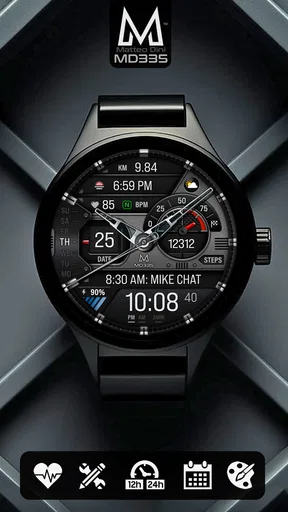
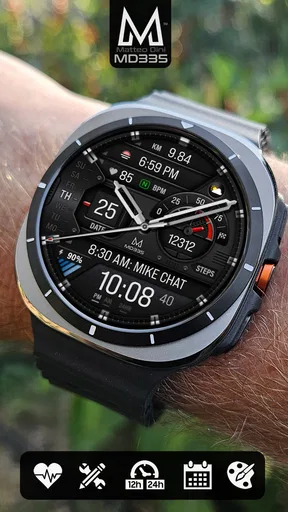
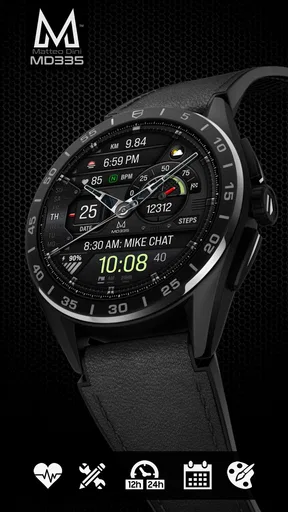
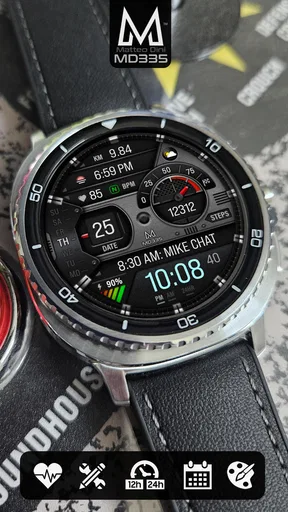
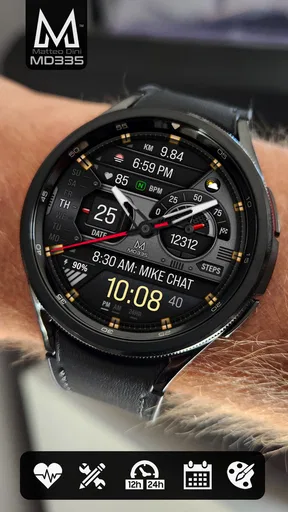
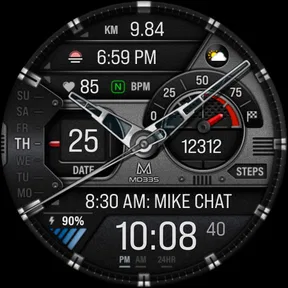
First things first, let’s talk aesthetics. The MD335 Hybrid is a stunning mix of modern digital with a classic analog feel. It’s like wearing a tuxedo with sneakers – elegant but cool. The watch face is customizable with a variety of color schemes, letting you switch things up depending on your mood or outfit. Trust me, it’s like having multiple watches in one.
What really caught my eye is the sharpness of the display. It’s crisp, clear, and the details just pop. Whether it’s the hands on the analog section or the digital stats, everything is easy to read at a glance. Plus, the ambient mode keeps it looking sleek even when you’re not actively checking the time.
Functionality Meets Flexibility
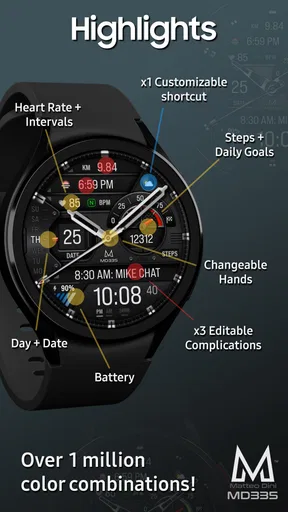
Functionality is where the MD335 Hybrid shines. You get a blend of analog and digital displays, so you can have the best of both worlds. I love that you can see your steps, heart rate, and date all at once. It’s like having a personal assistant on your wrist, minus the awkward small talk.
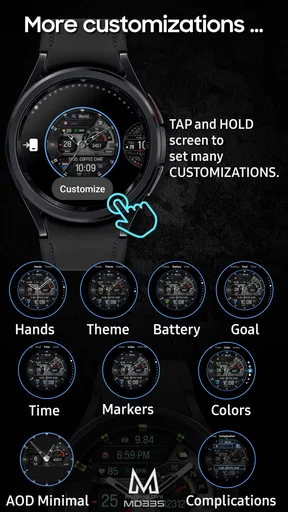
Now, I’m someone who likes to keep things simple, and this watch face delivers on that front. The interface is intuitive, and customizing your display feels like a breeze. You’ve got options to adjust what’s shown, so if you’re more about tracking your fitness than checking the weather, you’ve got the freedom to switch it up. All the power without the complexity – it’s a win-win.
Performance and Battery Life
Okay, we’ve all been there – a watch face that drains your battery faster than a toddler on a sugar high. But not with this one. The MD335 Hybrid is surprisingly gentle on your battery life. I’ve gone a full day with heavy usage and still had plenty of juice left. It’s designed to be efficient, which makes it a practical choice for everyday wear.
Performance-wise, it’s smooth sailing. No lag, no glitches, just seamless operation. It’s like the watch face is one step ahead, anticipating your needs. Whether I was swiping through notifications or checking my heart rate post-run, it didn’t miss a beat.
Compatibility and Installation
Now, no one wants to deal with a tech headache, and thankfully, the installation process is straightforward. It’s compatible with most smartwatches, so you don’t have to worry about it playing nice with your device. A quick download, a few taps, and boom – you’re in business.
It’s a small download too, which means it won’t hog your device’s storage. I’m all about minimizing clutter, digital or otherwise, and this app respects that.
Final Thoughts
So, would I recommend the MD335 Hybrid? Absolutely. It’s got the looks, the brains, and the stamina to be a staple in your smartwatch lineup. Whether you’re a fitness enthusiast, a professional, or just someone who appreciates a good design, this watch face ticks all the boxes. It’s like having a Swiss Army knife on your wrist – versatile, reliable, and always stylish.
If you’re ready to upgrade your smartwatch game, give the MD335 Hybrid a shot. You can find it on your app store, and trust me, your wrist will thank you.
My bottom line for a shared household
My recommendation is strongest for an individual Wear OS owner who wants an analog look without giving up selected digital details. The useful household distinction is simple: the face can be tailored to a wearer, but it does not make a watch shared, coordinated, or child-managed. If one person owns and wears the watch most of the time, the customization has a clear purpose. If several people expect the same device to adapt to them, a straightforward built-in face and separate planning tools may be less frustrating.
For me, the best way to decide is to begin with the details I truly check, choose a readable color scheme, and live with that setup through a normal day before adding anything else. That approach makes the face’s flexibility work for the wearer instead of turning the display into a tiny dashboard. It is a polished personalization choice when the balance suits your habits, but it is not essential for someone already happy with a simpler default.
Pros
- Highly customizable design options.
- Displays comprehensive health metrics.
- Battery-efficient performance.
- Clear and easy-to-read interface.
- Compatible with multiple smartwatch models.
Cons
- Limited free customization features.
- Some metrics require premium access.
- Occasional syncing delays with phone.
- May lack compatibility with older devices.
- Premium version can be pricey.
FAQs for MD335 Hybrid watch face
What features does the MD335 Hybrid watch face offer?
The MD335 Hybrid watch face offers a blend of digital and analog displays, customizable color themes, and interactive complications. It includes features like heart rate monitoring, step tracking, and weather updates. Users can personalize their experience by adjusting the display settings and choosing which metrics to show.
Is the MD335 Hybrid watch face compatible with all smartwatches?
The MD335 Hybrid watch face is designed primarily for Wear OS smartwatches. It's important to ensure your device supports third-party watch faces and has the necessary OS version. Compatibility with Tizen-based Samsung watches may be limited, so check the app details before downloading.
How can I customize the MD335 Hybrid watch face?
Customization is easy with the MD335 Hybrid watch face. Users can access settings directly from the watch or through the companion app on their phone. Options include changing color themes, adjusting the layout of complications, and selecting which metrics to display. This flexibility allows for a highly personalized watch face.
Does the MD335 Hybrid watch face affect battery life?
Like most feature-rich watch faces, the MD335 Hybrid may impact battery life, especially if using real-time updates and animations. However, the app provides options to optimize performance, such as reducing refresh rates and limiting background updates. Users should balance aesthetics and functionality to manage battery consumption.
Are there any costs associated with the MD335 Hybrid watch face?
The MD335 Hybrid watch face typically offers a free version with basic features, while premium options may require a one-time purchase or subscription. The premium version usually unlocks additional customization options and removes ads. Users should check the app store for specific pricing details and in-app purchase options.


